


ComicID: Comic Book Scanner
3.722.00 Reviews
App Specs
- Version
- 1.4
- Updated On
- License
- Free
- Downloads
- 10,000+
- Developer
- The App Dude
- Categories
- Comics
- Platform
- Android
Screenshots
 Analysis by AppCompare
I’d approach Comic Scanner - Book Value as a quick first stop for making sense of a comic collection, not as the final word on what an issue is worth. Its central idea is simple: use a phone camera to identify comics, then use that information to help organize a collection or consider a sale. If you’re new to collecting, that promise can feel reassuring; if you already know the differences between editions and conditions, you’ll want to treat any estimate as a starting point and check the details carefully.
What a first-time user should expect
This is a comics app from The App Dude, and its focus is more practical than recreational. You are not opening it for a reading experience or a place to browse storylines. The appeal is having a way to turn a physical stack of books into information you can review on your phone. The app is free to download, though in-app purchases are listed from $4.99 to $18.99 per item, so I’d check what a paid option covers before deciding to buy anything.
It has an average rating of 3.7 from around a hundred ratings, which suggests a mixed but useful picture rather than universal satisfaction. I’d read that as a reason to try it with a few comics before committing to a large cataloging project. It has over 10,000 installs, is rated for Everyone, and its current version is 1.3. It was released on October 10, 2025, and requires Android 7.0 or later. Those details make it accessible to many Android users, while the app’s listing also indicates iOS availability.
For a first session, I’d set a modest goal: identify one comic you can verify by sight, then see whether the result gives you enough confidence to continue. That approach is more useful than immediately scanning a whole shelf. A known issue gives you a reference point for judging recognition, and it helps you notice whether the information shown matches the exact book in your hands.
Getting the first scan right
Once you’re ready, choose a comic with a clear, unobstructed cover and good lighting. Keep the phone steady and make sure the cover fills enough of the camera view to be recognizable. These are simple steps, but they matter: a reflective sleeve, a bent cover, or a shadow can make visual identification less dependable. I’d remove a comic from a glossy bag only if that feels safe for its condition; protecting a valuable book is more important than getting a perfect scan.
The first useful result is not merely seeing a title appear. Check that the issue and edition actually match your copy before you rely on the displayed value. Comics can have alternate covers, reprints, and editions that look similar at a glance. If a result seems questionable, compare its identifying details with the book itself and try manual entry where needed. That small verification step can prevent a tempting but inaccurate estimate from shaping a buying or selling decision.
When a scan doesn’t recognize a less familiar title, that doesn’t necessarily make the app useless. The original article describes manual entry as an option for those cases, which gives you a fallback instead of forcing you to abandon the task. I would keep a short note of the details you used for a manual lookup, especially if you plan to revisit the same comic later. It makes it easier to check that you are comparing like with like rather than accidentally treating two similar issues as one.
Worth Reading Before You Choose

Baby Panda World Brings Quick Play to Modern Phones, but Its Game Library Feels Busy

ESPN’s Live Game View Makes Following Close Games Easier

QuizzLand Review: A Good Fit for Short Trivia Breaks, Not Every Player

Basketball Stars: Multiplayer Is Fast, but Can It Recover When Matches Go Wrong?

WEBTOON Turns Phone Updates Into a Better Reading Routine

Link to Windows Runs on Shared Habits, Not Social Feeds
Reading the value without overreading it
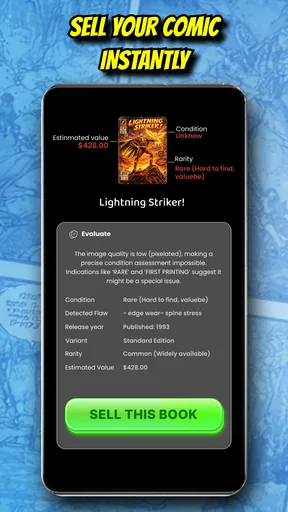
A displayed estimate can help you sort a collection into questions worth investigating: which books might deserve closer research, which ones you may want to keep, and which could be candidates for sale. I wouldn’t treat a single number as a guaranteed selling price. A comic’s condition, edition, and the details of a particular transaction all affect what a buyer may offer. Use the app to narrow your attention, then compare the exact issue and condition against other current offers before setting a price.
That distinction is especially helpful when you are deciding whether to sell a box of older comics. Instead of assuming every book is valuable or dismissing the whole box as ordinary, scan a representative handful first. If a result looks promising, inspect that copy more carefully and verify its edition. This is a practical way to spend time where it may matter, without letting a quick estimate turn into an unsupported expectation.
Building a library you can actually use
The collection-management side is most useful when you make it part of a repeatable routine. Add comics in small batches—perhaps after bringing home new issues or while sorting one section of a shelf—rather than trying to document everything in one long sitting. A digital record can help you remember what you own, but it is only as dependable as the information you enter. I’d pay particular attention to duplicate issues and similar covers, since those are easy to confuse when you are moving quickly.
Personal notes can add context that a scan cannot: where you found an issue, whether it needs a closer condition check, or why you want to keep it. I’d use notes for decisions and reminders, not as a substitute for a careful description if you later list a comic for sale. If you are cataloging books for someone else, agree on a simple naming approach first. Consistent notes make the library more useful when another person needs to understand it.
Where the social side fits
The community feature may appeal if you enjoy comparing interests and asking other collectors for perspective. I’d treat that conversation as a source of ideas, not a replacement for checking an issue’s identity and condition. A collector’s opinion can help you spot a detail you missed, but it is still worth verifying any claim that would affect a purchase or sale. If you mainly want a private inventory, the social aspect may not be the reason you choose the app, and that is fine; the scanning and organizing workflow is the more direct fit.
Compared with searching each comic manually, scanning offers a faster first pass and can make a large pile feel less intimidating. A spreadsheet or a handwritten list, on the other hand, gives you more control over exactly what you record and does not depend on automatic recognition. Dedicated collector references may be a better choice when you need deeper issue-by-issue research. I see this app as a convenient bridge between a physical collection and more careful checking, rather than a replacement for every other method.
A realistic first week with the app
Imagine you have a free evening and a box of comics you inherited or haven’t looked through in years. I’d start with a handful whose covers are easy to see, scan them, and verify the results against the printed issue information. Then I’d note which books were recognized confidently and which needed manual details. That immediately tells you whether the app is a good match for the kinds of comics you own, before you invest time entering the rest.
On another day, you could continue with one small section of the box and use the library to keep track of what you have already checked. If a comic’s value catches your eye, set it aside for a closer condition review instead of pricing the entire collection from the first pass. This workflow keeps cataloging manageable and separates identification from the more demanding work of deciding what a book is worth to a real buyer.
Who will get the most from it
I think it makes the most sense for casual collectors, people sorting inherited comics, or anyone who wants a more organized starting point before buying or selling. It may also suit a collector who enjoys discussing books with others and wants collection information close at hand. The strongest use case is a mixed collection where you need help identifying what deserves further attention, rather than a rare-book appraisal where every detail must be established precisely.
I’d skip it—or use it only as a secondary tool—if you expect every cover to be recognized, need a guaranteed sale price, or want specialist-level research without checking anything yourself. It is also not the right answer if you prefer a fully custom inventory and are happy maintaining one manually. Those alternatives take more effort, but they can give you tighter control over condition notes and the exact fields you track.
Keeping expectations grounded
The main friction is the gap between a quick identification and a dependable valuation. A scan can save time, but a close-looking edition or an obscure title may need extra work. Manual entry is a useful fallback, though it shifts some of the identification burden back to you. I’d also avoid making a sale decision based only on an app estimate: confirm the issue, assess its condition honestly, and look at comparable offers before agreeing on a price.
My overall recommendation is to try it with a few books you already know, then expand only if the results are useful for your collection. That gives you an inexpensive way to judge its recognition and organization workflow without expecting it to settle every collector question. For a beginner, the best first success is not discovering a fortune; it is turning an uncertain pile into a short, verified list of comics worth a closer look.
Have you ever found yourself staring at a mountain of comic books, wondering if some hidden gems are worth a small fortune? Enter Comic Scanner - Book Value, the app that promises to be your pocket-sized comic book expert. I took it for a spin to see if it lives up to the hype.
Getting Started with Comic Scanner - Book Value
Installing Comic Scanner - Book Value was a breeze. Available for both Android and iOS, the app welcomes you with a clean, user-friendly interface. It's intuitive enough that even your grandma could navigate it, provided she’s into comics, of course! Once you're in, the app opens up a world of possibilities with its variety of features.
Scanning Your Collection
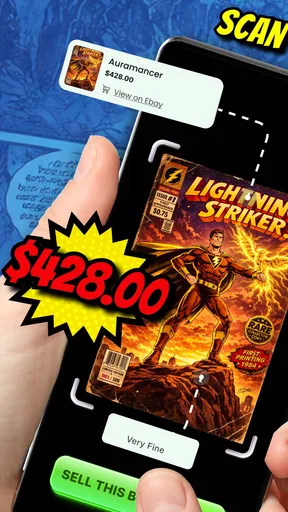
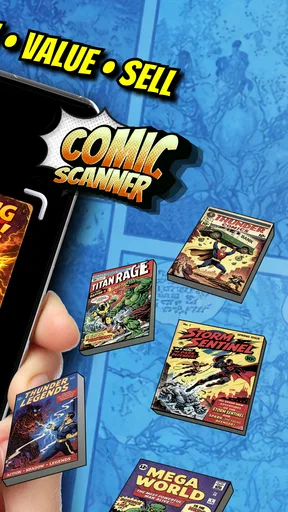
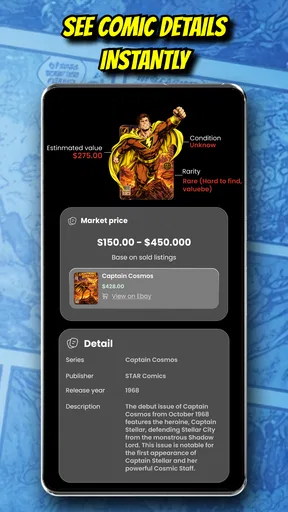
The main attraction here is the scanning feature. Simply point your phone’s camera at a comic book's cover, and voila! The app identifies the comic and provides details about its current market value. It’s like magic, but better because it’s real.
During my test, I scanned a few issues from my collection. The app quickly recognized most of them, although it did stumble on some less mainstream titles. But hey, even the best of us aren’t perfect. For those rare comics, you can manually input details to get the valuation, which I found quite handy.
Market Value Insights
Once a comic is scanned, the app presents its estimated value based on real-time market data. This is particularly useful for collectors who are ready to sell or just want to brag about their collection’s worth. The app updates these values regularly, so you’re always in the loop about what your comics could fetch on the open market.
Collection Management
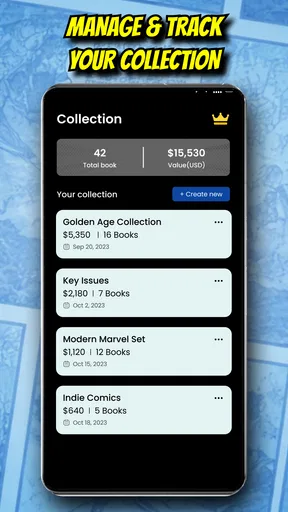
Beyond scanning and valuing, Comic Scanner - Book Value doubles as a collection management tool. You can create a digital library of your comics, complete with details about each issue. This feature is a godsend for anyone who’s ever misplaced a favorite issue in the chaos of their collection.
The app allows you to categorize and sort your comics, making it easy to keep track of what you have and what you need. Plus, you can add personal notes about each comic, like where you bought it or that time Stan Lee signed it, making your library uniquely yours.
Community Features
Another cool aspect is the community feature. You can connect with other comic enthusiasts, share your collection, and even get advice on purchases and sales. It’s like having a comic convention in your pocket, minus the cosplay.
Being part of this community adds an extra layer of engagement. I found myself chatting with fellow collectors about the latest trends and even got some tips on which issues to keep an eye out for. It’s a great way to expand your network and learn from others.
Final Thoughts
Overall, Comic Scanner - Book Value is a must-have for any serious comic book collector. It seamlessly combines practicality with a touch of fun, making it easier than ever to manage and appreciate your collection. While it may have a few hiccups with rare titles, its overall functionality and community features more than make up for it.
If you’ve got a comic collection gathering dust, this app might just give you the nudge you need to dive back into the world of superheroes, villains, and epic storylines. Whether you’re looking to sell, buy, or just admire your collection, Comic Scanner - Book Value is a trusty sidekick every collector needs.
Pros
- Accurate price estimates for collectors.
- Easy-to-use interface for quick scans.
- Supports multiple comic formats.
- Offline access to saved data.
- Frequent updates with latest prices.
Cons
- Limited to popular comic series.
- Requires camera permissions.
- Occasional misreads of barcodes.
- Ads in the free version.
- No export option for price data.
FAQs for ComicID: Comic Book Scanner
What is Comic Scanner - Book Value and how does it work?
Comic Scanner - Book Value is an app designed to help comic book enthusiasts evaluate the worth of their collections. By using your device's camera, the app scans barcodes or covers to retrieve pricing information from a vast database. This allows users to quickly assess the market value of their comics.
Is Comic Scanner - Book Value available on both Android and iOS?
Yes, Comic Scanner - Book Value is available for download on both Android and iOS platforms. Users can find the app on the Google Play Store for Android devices and the Apple App Store for iOS devices, ensuring accessibility across different mobile operating systems.
Does Comic Scanner - Book Value require an internet connection to function?
Yes, the app requires an internet connection to access its extensive online database for accurate and up-to-date comic book pricing. While scanning can be done offline, retrieving pricing and valuation data necessitates connectivity to ensure users receive the most current information.
Are there any in-app purchases or subscription fees?
Comic Scanner - Book Value offers both free and premium features. While basic scanning and valuation are free, users can unlock additional functionalities such as detailed historical pricing data and ad-free usage through in-app purchases or a subscription model, enhancing the user experience.
How accurate is the pricing information provided by Comic Scanner - Book Value?
The app uses a comprehensive and frequently updated database to ensure pricing accuracy. However, prices can fluctuate due to market trends and collector interest. While the app provides a reliable estimate, users should cross-reference with other sources for precise valuation, especially for rare or unique comics.


